
Quick answer
When Kling AI Motion Control is not working as expected, diagnose the input pair before rewriting the whole prompt. Check the character image first if identity drifts, the reference video first if movement is distorted, and the relationship between both inputs if the background jumps or body proportions change. The character image should clearly show the person you want to preserve. The motion reference should show one readable performer, steady pacing, and framing that matches the character image closely enough for the movement to transfer.
Motion transfer does not automatically repair every character-consistency problem. Kuaishou's official Motion Control guidance assigns different jobs to the two inputs: the image establishes appearance, while the reference video supplies movement. Its troubleshooting guidance also recommends matching framing and proportions, using a clear subject, avoiding heavy occlusion, and reducing unnecessarily fast or complex motion. KlingVideo's current workflow accepts one character image and one reference video, with image or video orientation plus 720p or 1080p output. Fix the earliest conflict in that chain before paying for another attempt.
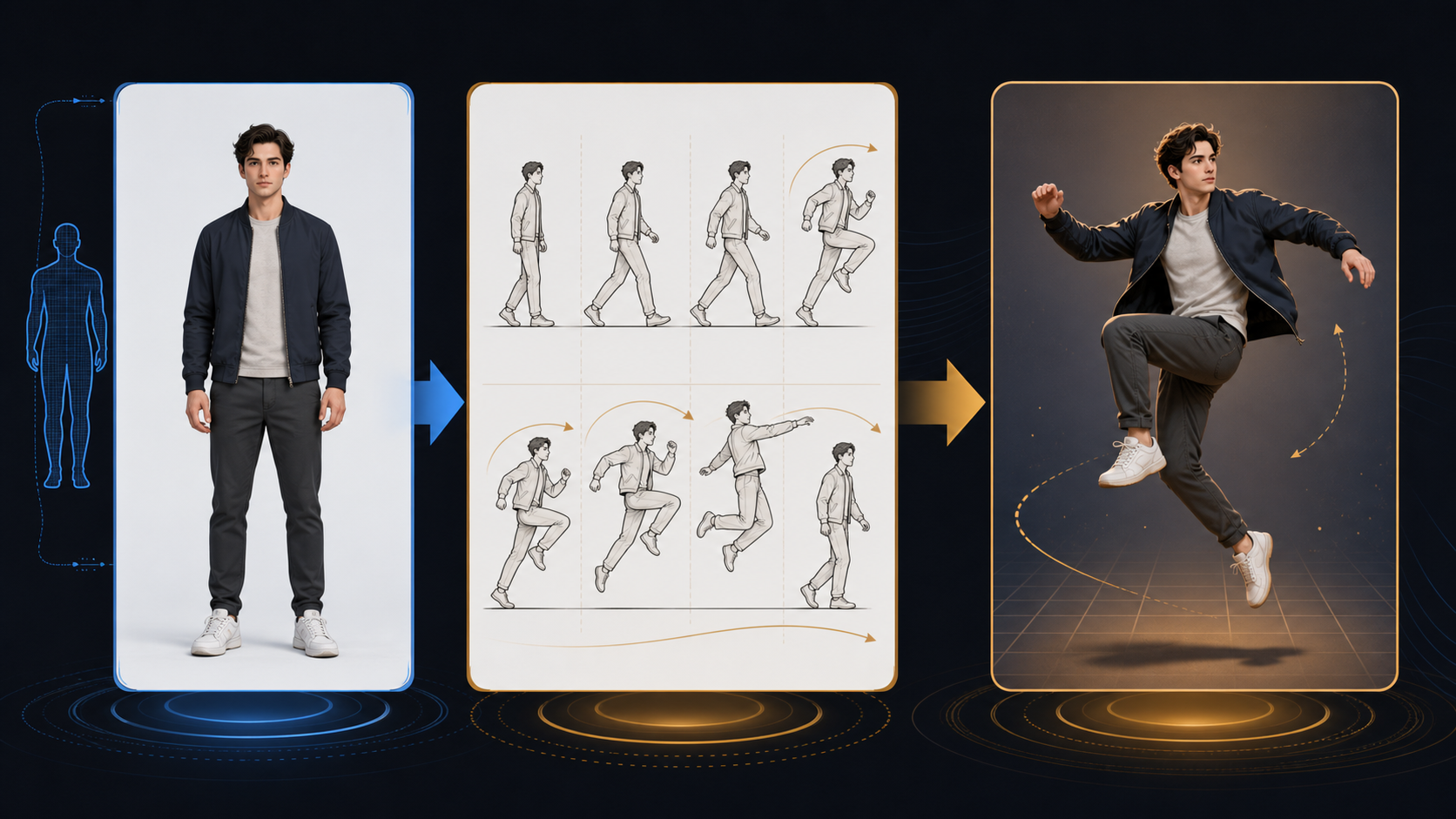
Symptom, likely conflict, and first fix
| Symptom | Inspect first | First fix |
|---|---|---|
| Face or clothing identity drifts | Character image quality and occlusion | Use a sharper image with a clear face, body outline, and fewer overlaps |
| Arms or legs distort | Reference movement speed, hidden joints, and framing | Choose a slower reference with visible joints and simpler movement |
| Body proportions change | Character image and video use different crops or proportions | Match full-body with full-body, or upper-body with upper-body |
| Background bends or jumps | Camera motion and competing background detail | Use a steadier reference and a simpler character-image background |
| Character slides instead of stepping | Feet are cropped, hidden, or move too quickly | Show the feet and use a reference with clear weight transfer |
| Motion is weak or incomplete | Action is subtle, partially hidden, or outside the shared frame | Use one readable action that remains visible from start to finish |
Start with the row that best describes the first visible failure. Later artifacts can be consequences of an earlier mismatch. For example, a close-up image paired with a full-body spin may first change body proportions, then produce distorted arms as the shot tries to invent missing space.
Fix identity drift by improving the character image
The character image carries appearance. Inspect it as a source asset, not as a pretty thumbnail.
The face should be large enough to read, but the crop also needs to include the body area used by the reference motion. Keep hair, hands, sleeves, and the outer body line separated from the background. Avoid strong occlusion, such as one arm crossing the torso while the reference requires both arms to swing independently.
Clothing with clear shape and color blocks is easier to track than a pattern that visually merges with the background. If a logo, accessory, or product must remain unchanged, make it readable in the character image and reduce motion that repeatedly hides it.
Do not assume a prompt can recover identity information that the image does not show. If the reference performer turns sideways but the target image gives no useful side-profile evidence, use a smaller turn or prepare a more suitable character image.
Fix distorted movement by simplifying the reference video
The official Kling guidance recommends a clear subject, matched proportions, and movement that can be followed without unnecessary ambiguity. For the first repair attempt, choose a reference with:
- One main performer.
- The important joints visible for most of the action.
- A steady pace instead of a sudden burst.
- Limited occlusion from props, clothing, or other people.
- Framing that stays stable enough to follow the body.
- One action with a clear beginning and end.
Fast spins, floor work, crossed limbs, rapid direction changes, and motion blur ask the transfer to solve several hard problems at once. They may be valid creative goals, but they are poor diagnostic references. First prove that the input pair can transfer a moderate version of the action. Then increase speed or range one variable at a time.
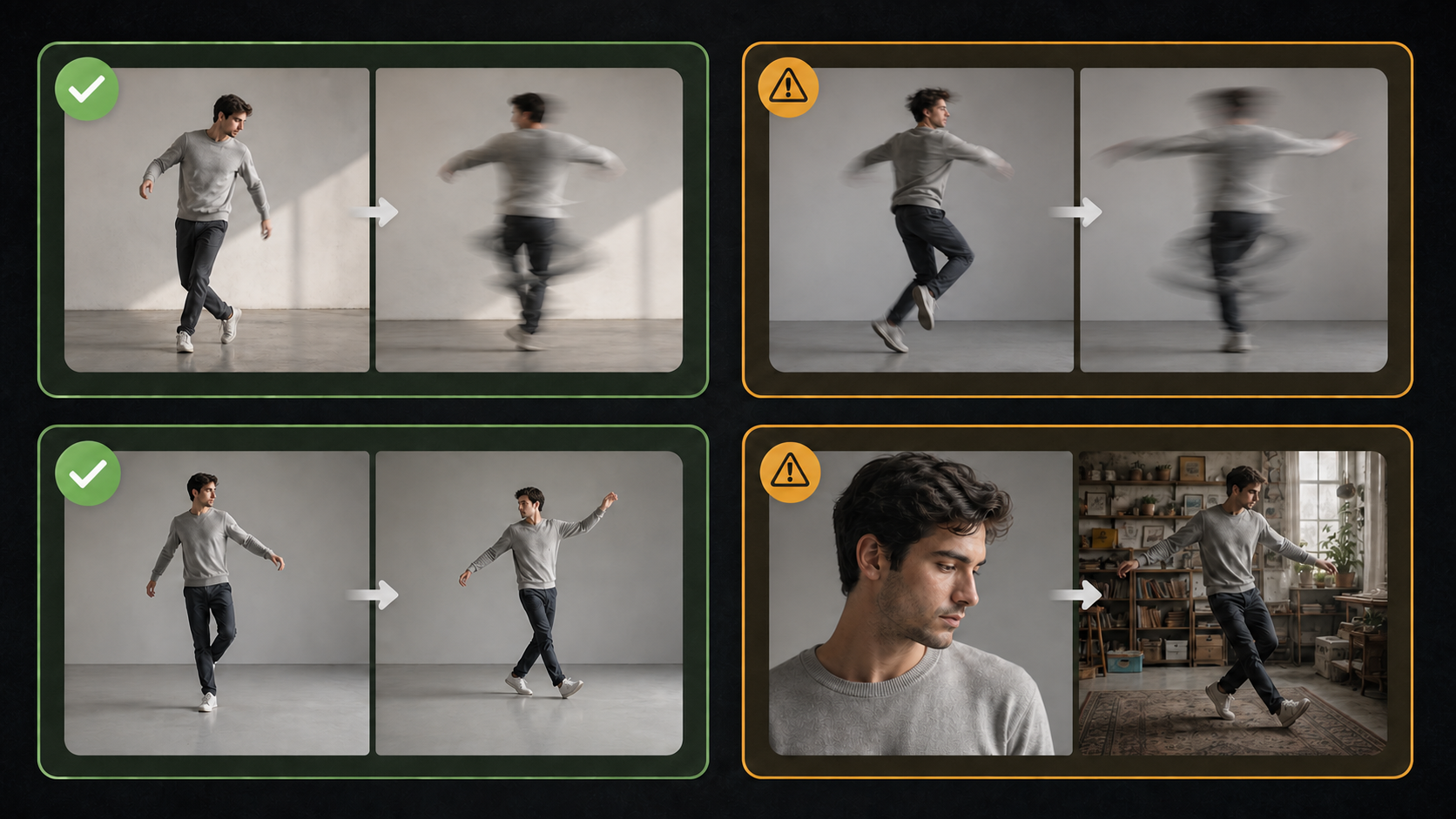
Fix background and camera jumps by removing input conflicts
Background instability can come from more than one source. The character image may have strong perspective lines, reflections, or people behind the subject. The reference video may contain a handheld pan or a fast zoom. When both inputs imply different camera behavior, the transferred shot has no simple visual anchor.
For a repair test, reduce the conflict:
- Use a character image with a simple background and clear separation around the body.
- Prefer a reference where the camera is stable and the performer supplies the movement.
- Match the reference orientation to the intended composition.
- Keep important body parts inside the frame throughout the action.
- If camera movement is essential, use one gentle, consistent direction rather than several changes.
KlingVideo currently offers image orientation or video orientation in its Motion Control workflow. That choice cannot repair a severe framing mismatch by itself. Use it after the source materials already agree on what the shot should contain.
A reviewable failure diagnosis
Imagine this input pair:
- Character image: a waist-up portrait, right arm partly hidden, busy street background.
- Motion reference: a full-body dancer who spins quickly, crosses both arms, and steps toward the edge of a handheld shot.
The requested result shows identity drift, stretched arms, and a jumping background. The pair contains three visible conflicts before any generation begins: the crops do not match, the target arm is hidden, and the reference combines fast body motion with camera motion.
Use this repair order:
- Replace the character image with a clear full-body view and visible arms.
- Use a stable full-body reference with the same general proportions.
- Reduce the first test to a slower quarter turn and one arm movement.
- Confirm that the body remains stable before restoring a faster spin.
- Add camera movement only after the character transfer works with a static frame.
This is a reproducible input-pair diagnosis, not a claim based on a hidden generation. Anyone can inspect the crop, occlusion, speed, and camera conflict. No paid output was created for this example.
When to switch workflows
Motion Control is useful when a reference video's body movement is the main control signal. It is not always the simplest tool for the job.
Switch to image to video when you have one strong image and only need a small, prompt-described action such as a head turn, product rotation, or gentle camera push. A motion reference can add complexity without adding useful control for those shots.
Stay with video to video or Motion Control when the exact rhythm, pose sequence, or performance matters and you can provide a compatible reference clip. The Kling 3.0 Motion Control page explains the model-level workflow; this article focuses on what to fix after the first result goes wrong.
If the desired action repeatedly leaves the frame or hides essential joints, prepare new source material. Repeating the same incompatible pair is unlikely to isolate the cause.
Review after each repair
Change one variable, then compare the same checkpoints:
- Is the face and clothing identity stable in the first, middle, and last frames?
- Do elbows, wrists, knees, and ankles remain plausible during the fastest movement?
- Does the body keep roughly the same proportions?
- Does the background preserve its main lines and objects?
- Does the action begin and end where expected?
- Did the changed input fix the target symptom without creating a larger one?
Save the more complex reference for later. A clean diagnostic pass is more useful than a spectacular failure with five possible causes.
FAQ
Why does my character change during Motion Control?
First inspect whether the character image clearly shows the identity details and body area used by the motion. Heavy occlusion, a small face, or a crop that does not match the reference can make identity harder to preserve. Reduce motion amplitude while testing the improved image.
What makes a good Kling AI motion reference video?
Use one clearly visible performer, stable framing, readable joints, a steady pace, limited occlusion, and an action with a clear start and finish. Match its body crop and proportions to the character image.
Why are the arms or legs distorted?
Common input risks include hidden joints, crossed limbs, fast motion blur, a crop mismatch, or body parts leaving the frame. Choose a slower and more visible reference before adding complexity back.
Can Motion Control fix a poor character image?
No. Motion Control transfers movement; it does not automatically create missing identity evidence or repair every consistency issue. Improve the character image first.
Should I use image orientation or video orientation?
Choose the orientation that matches the shot you need after the character image and reference video already use compatible framing. Orientation is a composition choice, not a repair for mismatched source material.
When should I stop retrying the same inputs?
Stop when the same crop, occlusion, or motion conflict remains visible. Replace the conflicting source, reduce the action, or switch to image to video if the motion reference is unnecessary.
Try the Motion Control workflow
Pair a clear character image with a stable, similarly framed motion reference, then open the KlingVideo video-to-video workflow. If the result drifts, fix the earliest visible input conflict and test one change at a time.
Sources and methodology
- Kling AI Motion Control User Guide, official Kuaishou Kling AI documentation. Used for the separate roles of the character image and motion reference, input matching, and Motion Control troubleshooting principles. Accessed 2026-07-21.
- Kling AI Motion Transfer Video Tutorial, official Kling AI tutorial. Used for clear-subject and matched-proportion reference guidance. Accessed 2026-07-21.
- Fix AI Video Drift and Consistency, official Kling AI guide. Used for framing, simple backgrounds, and controlled movement guidance. Accessed 2026-07-21.
- Kling 3.0 Motion Control and KlingVideo Video-to-Video, current KlingVideo pages. Used to confirm the supported site entry and settings. Verified 2026-07-21.
The failure example is a visible input-pair audit. No paid generation was run and no output claim is presented as a benchmark. Last verified: 2026-07-21.